If you’ve been exploring the Sims 4 Marketplace and noticed a gold coin currency called Moola, you’re probably wondering what it is and how it works. This guide covers everything you need to know, including what Moola is used for, how to buy it, and what you can get with it.
What Is Moola in The Sims 4?
Moola is an in-game currency used to purchase Maker Packs and Kits through the direct purchase store in The Sims 4. Maker Packs and Kits include Build/Buy and Create-A-Sim items for decorating rooms, designing builds, and styling Sims.
It’s separate from the regular Sims 4 store where you buy Expansion Packs, Game Packs, and Stuff Packs. Moola is specifically for content sold through the in-game Marketplace, which is where independent creators and collaborations with EA publish their work.
What Can You Buy With Moola?
Moola is used to buy content available on The Sims 4 Marketplace, which you can access directly inside the game. This includes Creator Kits and Maker Packs, which are sets of Build/Buy and CAS items made by creators in the Sims community.
The Marketplace is a growing space where you can find unique content that isn’t available anywhere else. Collections sold there are exclusive to the platform, so Moola is the only way to get them.
How to Access the Sims 4 Marketplace
You don’t need to open a browser to shop. The Marketplace is built into the game itself. Once you launch The Sims 4, look for the Marketplace button at the top of the screen. From there you can browse available collections, view item previews, and make purchases using your Moola balance.
How to Buy Moola
You can buy Moola in two ways: directly inside The Sims 4 through the Marketplace, or on the EA website. Both options use the same bundles and pricing.
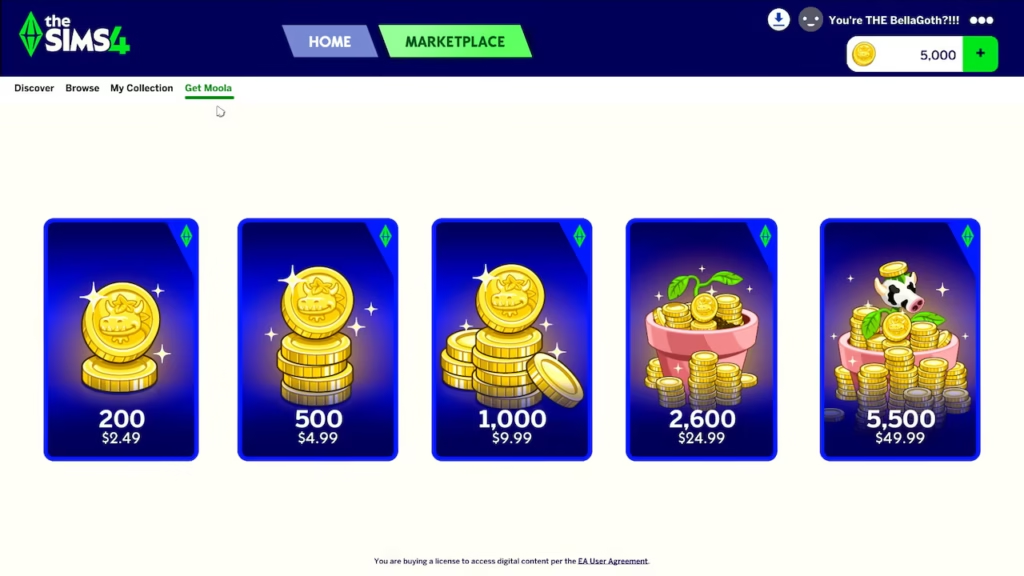
Moola is sold in five bundles:
- 200 Moola for $2.49
- 500 Moola for $4.99
- 1,000 Moola for $9.99
- 2,600 Moola for $24.99
- 5,500 Moola for $49.99
To buy in-game, open the Marketplace, click the Get Moola tab at the top of the screen, and select the bundle you want. Your balance will update instantly and you can start shopping right away.
Can You Use a Creator Code With Moola?
If you use a creator code at checkout, it does register as a supported purchase even on Moola transactions. However, the 5% discount that creator codes provide applies to Expansion Packs, Game Packs, and Stuff Packs purchased through the EA App or on TheSims.com. The discount does not apply to Moola purchases specifically.
That said, using a creator code when buying Moola is still a way to show support for the creators whose content you’re buying on the Marketplace. If you’re picking up my content, you’re welcome to use code SIXAMCC at checkout.
What SixamCC Content Is on the Marketplace?
I have Build/Buy and CAS collections available exclusively on The Sims 4 Marketplace. These are separate from the free CC packs available on my website and can only be purchased with Moola through the in-game store.
If you want to browse everything SixamCC has to offer outside of the Marketplace, you can find free CC downloads on the SixamCC website, get early access to upcoming releases on the early access page, and keep up with new releases on the SixamCC blog.
Is Moola Worth It?
The Marketplace is simply another option for getting new content in The Sims 4. It gives CC creators a way to sell their work directly through the game, and it gives players access to exclusive collections they can’t get anywhere else. Nothing on the Marketplace is required to enjoy the game, and free CC isn’t going anywhere. It is just an addition and not a replacement.
Whether it’s worth spending Moola comes down to what you find there and how you feel about it. If a collection genuinely appeals to you and you want to support the creator behind it, it’s there. If you’d rather stick to free downloads, that’s a completely valid choice too. The Sims has always been a game you play your way, and that hasn’t changed.
If you have more questions, EA put together a detailed Marketplace and Moola FAQ covering everything from how purchases work to how Makers earn from their content.